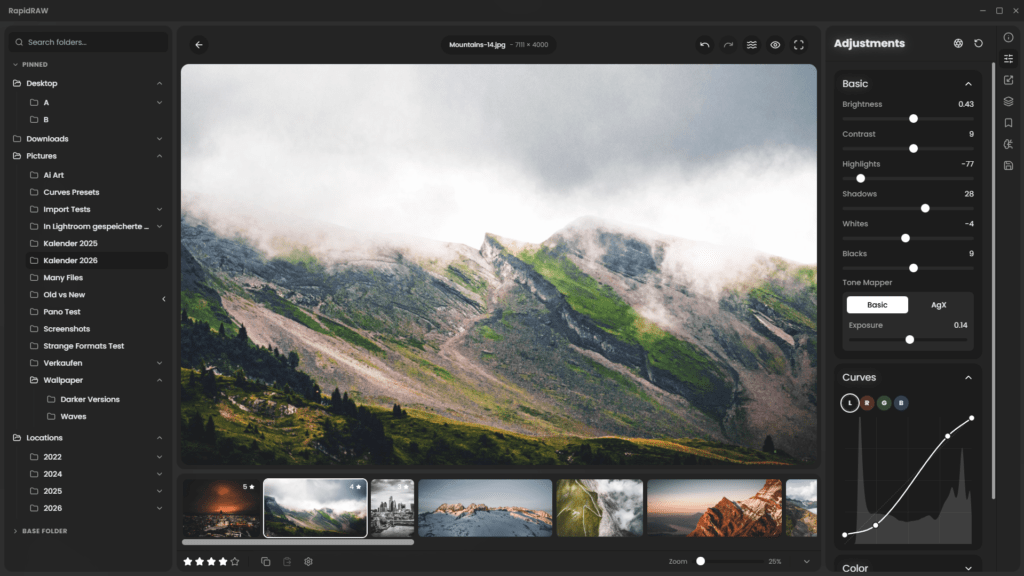
The new, free Lightroom killer
When I started my journey in photography I tried pretty much all the free alternatives for editing raw photos. But it just so happened that while I was stepping up my photography game, I had access to Adobe’s Lightroom through my workplace subscription. Therefore, I got used to using it for both work and my own company. And I loved it. I’ll be the first to admit, I do like Adobe’s products – However, I do not align with their philosophy regarding AI and pricing structure.
That’s why once I quit my old job, I started to look elsewhere for alternatives. Ultimately I landed on Luminar Neo, which I actually already had a perpetual license for laying around. But somehow, over the years I’ve been using it ever since, it never felt quite right. It felt like some things were missing, coming from the LR experience and the way It makes edits in a linear “stacking” way, not being able to edit previous settings without temporarily discard newer ones, never felt intuitive or effective. And let’s not even speak about the performance of Luminar Neo, requiring hours to export large batches of photos, and frequent restarts due to errors and images getting stuck loading indefinately.
Then I saw the light…
… when one evening I saw a video pop up in my YouTube feed. The video named “Free Lightroom Clone… Try This NEW Alternative…” by *Tony Photo Pilot,* immediately caught my attention.
The video presented a new, lightweight raw editor, needing nothing more than a folder of images to work. No database, no proprietary library, just raw files and xmls. Weighing in at a size of only 78,8 MB in size, it felt too good to be true.
It would take a few weeks for me to finally be able to try it out for myself, but when I did, oh boy was I delighted. Blazing speeds, an editing workflow much similar to Lightroom and a clean, simple yet powerful UI. The edits I would have spent about 5 minutes on in Luminar was now done in about a minute in RapidRAW.
What about AI
I know what you’re probably thinking… Yes, RapidRAW does contain a bunch of AI features, just like Lightroom, Luminar and most other big editors nowdays. It is also highly probable that RapidRAW itself is built by/with the help of AI. Based on the software’s own website, getrapidraw.com, it took mere weeks from idea to first release. All this by a single, independent developer, I find it hard to believe RapidRAW would be built without the help of AI. We get no official statement on this, as far as I have found, but honestly, I don’t mind. A software that helps photographers world wide, providing extraordinary editing experience for free to everyone, is great no matter AI is involved or not. This is of course up to personal opinion, but I would argue that there is no issue, as long as this software stays free/donation supported.
Usage and features
I’m not gonna waste time explaining and listing all features and the entire experience in great detail. Instead, just try it yourself. The app takes seconds to download, literally.
Read more about the RapidRAW project over at getrapidraw.com
Note: LimeBay Media is by no means related or connected to RapidRAW or their developer. This is purely my own opinions and a way to spread the word about software I believe in and like myself.